Your Site’s Internal Links Are Trash: The No-Fluff Playbook for Dominating Google and AI Search
Internal linking is the practice of hyperlinking one page of your website to another page on the same domain. In plain English, it’s building bridges between your own pages so search engines and users can find them. Doing it right distributes your ranking power, helps bots discover your content, and guides visitors through your site.
We’ve all published what we thought was an absolute masterpiece, only to watch it rot on page 47 of Google search. Just me? Cool. I’ve spent over a decade in this industry, and I can tell you that fixing your internal links is the single easiest way to stop that from happening.
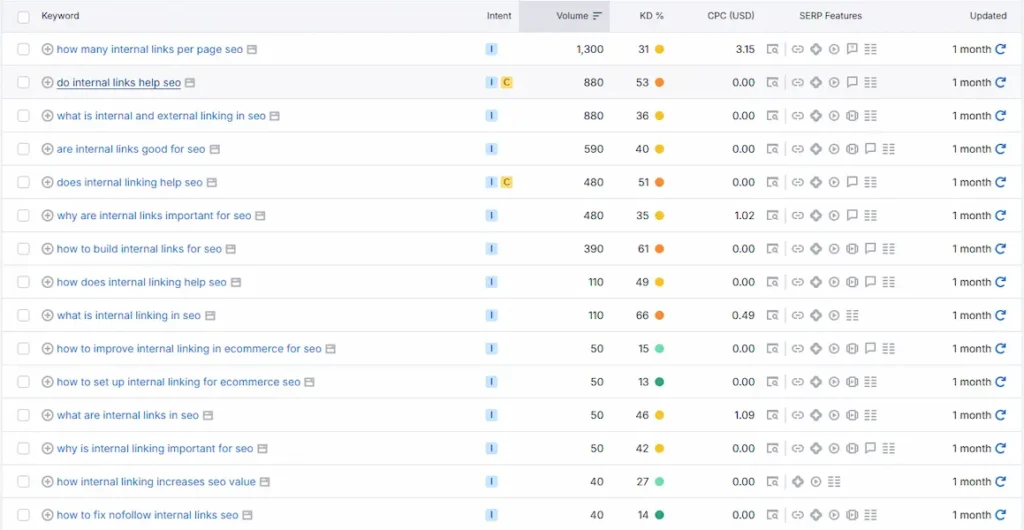
But the game is changing. As real search data from Semrush confirms, the questions Canadians are asking about internal linking now span tools, ecommerce, WordPress automation, and AI-powered platforms, a clear signal that search intent has matured well beyond basic SEO. Today, Google AI Overviews trigger on roughly 48% of tracked search queries. Meanwhile, Perplexity AI has scaled to process over 780 million monthly queries. We are no longer just building site hierarchies for web crawlers; we are constructing semantic pathways for LLMs. Let’s break down how to build a site that dominates both worlds.
What you’ll need to optimize your site:
- A crawling tool to audit your existing structure (e.g., Screaming Frog or Semrush Site Audit).
- Access to your Google Search Console to track crawl logs and traffic performance.
- An internal linking tool to save hours of manual work: Link Whisper or Yoast SEO Premium for WordPress sites, LinkStorm for non-WordPress CMS platforms, or Semrush/Ahrefs Site Audit for enterprise-level audits and opportunity mapping.
- About 2 to 3 hours of focused optimization time, depending on your site’s size.
Before we dive into the weeds, let’s understand the landscape. Here is how traditional search, Answer Engine Optimization (AEO), and Generative Engine Optimization (GEO) view your internal links:
| Search Era | What it Targets | How Content is Structured | Primary Benefit | Best For |
|---|---|---|---|---|
| Traditional SEO | Search engine crawlers (Googlebot, Bingbot) | Hierarchical taxonomy (category and subcategory silos) | Distributes PageRank and improves organic keyword positions | Ranking on traditional search engine results pages |
| AEO (Answer Engine) | Simple query parsers and voice search assistants | Q&A blocks, microdata, and schema markup | Secures featured snippets and quick direct answers | Targeting simple informational search queries |
| GEO (Generative Engine) | Generative models (e.g., ChatGPT, Perplexity, Gemini) | Contextual entity maps, structured tables, and deep content hubs | Earns conversational brand citations in AI summaries | High-intent research and comparison queries |
Both approaches are necessary. Traditional SEO provides the structural road, while AEO and GEO put up the highly readable road signs that AI models require.
What are the key benefits of an effective internal linking strategy?
An effective internal linking strategy passes ranking power across your domain, helps search engines index your pages faster, and maps out your site’s semantic structure.
Think of internal links as the interior hallways of your house, while external links are the roads connecting your house to a public park. While I love earning high-quality external backlinks, those are notoriously hard to control. Internal links, on the other hand, are completely free, and you have absolute power over how they are built and where they point.
In my experience, many digital marketers spend thousands of dollars chasing external backlinks while ignoring their own internal architecture. That’s like buying a Ferrari and letting it rust in a locked garage.
Today, I use internal links to construct semantic entity maps. If I write about a complex topic, I ensure every sub-article links back to a centralized pillar page. This shows AI search engines like Google’s AI Overviews and Perplexity that our domain owns the entire neighbourhood, not just a single room.
According to Zyppy’s landmark study analyzing 23 million internal links, pages that received 40 to 44 incoming internal links earned nearly four times as many Google Search clicks as pages with four or fewer links. That is not a rounding error. It is a massive ranking force multiplier that you can deploy right now.
How do internal links influence search engine ranking algorithms?
Internal links influence ranking algorithms by directing the flow of PageRank and establishing contextual relevance through descriptive anchor text that search engines use to categorize your content.
If Google’s spider hits a page on your site and finds zero outgoing links, it hits a dead end. All your great content, smart keyword targeting, and brilliant copywriting won’t matter if search crawlers can’t reach those pages in the first place.
Having a site with no internal links is like running a supermarket where all the aisle doors are locked from the outside. You have the inventory, but nobody can buy it.
Let me give you a real example from my own work. When I audited an IT software development client, their core service pages were completely isolated from their blog. They had experienced a sudden 38% drop in organic traffic after Google’s core updates.
I ran a technical audit, identified all their orphaned blog posts, and restructured their internal linking. I strategically routed link equity from their top-performing informational blog posts directly to their key transactional service pages.
The result? Within six months, I reversed the entire 38% drop, grew their total organic search visibility by 22%, and achieved breakthrough rankings for their highest-value terms, all without building a single external backlink to those pages. Niche authority and internal architecture outperform generic, high-DR competitors every single day.
How do I build an effective internal linking strategy for large and ecommerce sites?
You can build an effective internal linking strategy for large and ecommerce sites by organizing your pages into tight topic clusters and linking deep into category hubs.
When managing large or e-commerce sites, you are dealing with thousands of pages. If your site taxonomy is chaotic, search engines waste your precious crawl budget mapping out a mess.
Here is my exact step-by-step blueprint for setting up a high-performance system:
- Identify and Link Orphaned Pages: Run a technical crawl using Screaming Frog or Semrush Site Audit to identify pages with zero incoming internal links. No important page should be orphaned; otherwise, search engines cannot easily find or rank them.
- Build a Hub-and-Spoke Structure: Link related sub-topics (the spokes) directly to a main, high-converting category page (the hub). Ahrefs case studies show that increasing links from level-one pages to deeper pages boosts traffic by up to 24% for level-two and level-three categories.
- Maintain Contextual Relevance: Place links inside your body text, not just in global footers. Google’s “Reasonable Surfer” model shows that links placed prominently in the main body carry far more weight than terms-of-service or footer links because users are actually likely to click them.
Some Tips: Locate your top five highest-traffic pages in Google Search Console, edit them, and place a direct, contextual link pointing to your newest, unindexed blog post to get it crawled and indexed within hours.
What is the best software for auditing and automating SEO internal linking in WordPress?
The best software for auditing and automating SEO internal linking in WordPress is Link Whisper, which uses semantic AI to suggest contextual links directly in your post editor.
As you saw in the “Brands” column of the AnswerThePublic screenshot, tools like Link Whisper and LinkStorm are dominating the organic conversation right now. But the full picture is broader: Yoast SEO Premium, Semrush Site Audit, and Ahrefs Site Audit each serve distinct use cases depending on your CMS, team size, and whether you are auditing existing structure or hunting new linking opportunities.
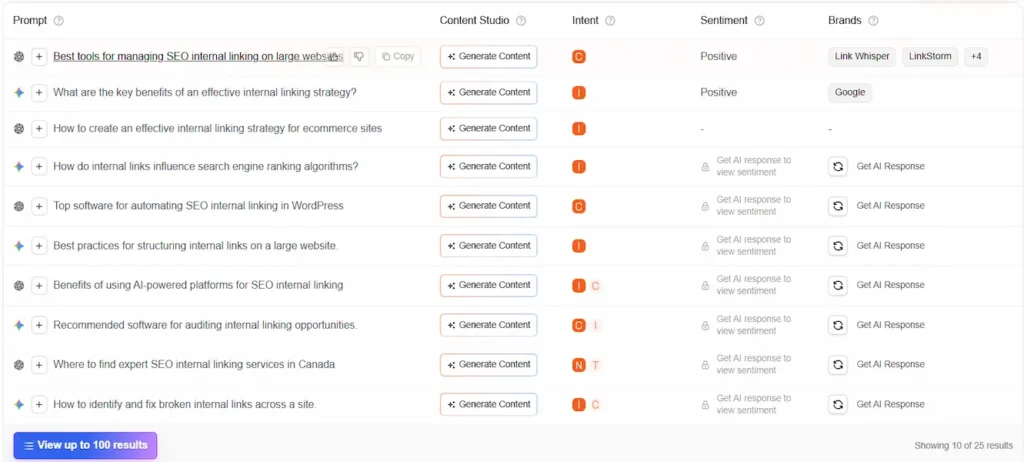
If you run a WordPress site, Link Whisper is my go-to recommendation for in-content linking. Its AI reads your content, understands context, and suggests exact anchor texts and links with a single click. For content-heavy WordPress teams already using Yoast for on-page scoring, Yoast SEO Premium is an excellent complement. Its siblings and Subpages blocks make the hub-and-spoke pillar linking nearly automatic.
If your site runs on Webflow, Squarespace, or a custom CMS, LinkStorm is the strongest option. It works across any CMS by combining AI content analysis with a standalone web interface. For enterprise teams or agencies managing multiple client sites, Semrush Site Audit adds Internal LinkRank (ILR) scoring and crawl depth mapping, ideal for auditing link distribution at scale. And if you want to find new linking opportunities without touching existing content, Ahrefs Site Audit’s “Internal Link Opportunities” report automatically maps keyword-to-page linking targets with exact anchor text suggestions.
If you’re wondering how they stack up, here is a quick breakdown:
| Tool | Best For | Standout Feature | Platform Support |
|---|---|---|---|
| Link Whisper | WordPress & Shopify | In-editor AI contextual suggestions | WordPress, Shopify |
| Linkilo | Advanced SEOs | Cannibalization and anchor text audits | WordPress |
| LinkStorm | Non-WordPress CMS | Cross-platform, standalone AI crawling | Any CMS (Webflow, Squarespace, Custom) |
| Yoast SEO Premium | WordPress content teams | In-editor linking suggestions + Siblings/Subpages blocks for pillar architecture | WordPress only |
| Semrush Site Audit | Enterprise & agency audits | Internal LinkRank (ILR) scoring, crawl depth mapping, and link distribution reports | Any CMS (cloud-based) |
| Ahrefs Site Audit | Opportunity-first workflows | “Internal Link Opportunities” report auto-maps keyword-to-page linking targets with exact anchor text | Any CMS (cloud-based) |
According to user reports, automating this process with AI tools like Link Whisper can save up to 12 hours of manual work per week. Add Ahrefs for opportunity discovery and Semrush for distribution audits, and you have a full-stack internal linking system that covers both traditional crawlability and AI citation readiness.
How do I identify and fix broken internal links across my site?
You can identify and fix broken internal links across your site by running a crawl with Semrush Site Audit to find 404 errors and updating them in your CMS.
Broken internal links are silent traffic killers because they redirect users and search spiders straight into a 404 dead-end, wasting crawl budget and evaporating authority.
To fix this, go to Semrush Site Audit, run a technical crawl, and navigate to the ‘Issues’ tab. Filter for ‘broken internal links’ to get a complete list of non-existent URLs. Then, open your CMS (like WordPress or Shopify) and manually swap out the broken URLs with correct, working links or remove them entirely. Doing this regularly ensures your site’s ranking authority flows cleanly without hitches.
And please, stop using generic phrases like ‘click here’ or ‘read more’ as anchors. Google uses your anchor text to understand what the destination page is about, so make sure it is descriptive and uses keywords naturally.
Some Tips: Spend five minutes changing generic internal anchors like “click here” or “read more” on your main pages to descriptive, keyword-rich anchor text.
Where can I find expert SEO internal linking services in Canada?
You can find expert SEO internal linking services in Canada by partnering with specialized regional agencies in the Greater Toronto Area, such as Gallea Ai or Ilon SEO Consulting in Vaughan.
As confirmed by both the AnswerThePublic prompt data and Semrush keyword research, “where to find expert SEO internal linking services in Canada” is an active navigational query in the Canadian market. If you are operating a business in the GTA, Vaughan, Toronto, or Halton Hills, relying on guesswork can cost you thousands in lost conversions.
Real-world regional players like Ilon SEO Consulting specialize in e-commerce consulting, ensuring your technical foundation, internal linking, and content strategy actually align to drive leads. Other reliable agencies like Gallea Ai weave strategic internal linking directly into on-page layouts and offer structured AEO/SEO packages designed to maximize search visibility for GTA businesses. Partnering with local specialists who understand both technical crawlability and regional search intent is the ultimate shortcut to search dominance.
Some Frequently Asked Questions on SEO Internal Linking Strategy
Do I need to redo all my existing content for AEO?
No, you should prioritize optimizing your top 20% of high-traffic pages and key conversion hubs first, rather than redoing everything. Focus on the pages that currently drive the majority of your leads or revenue. Adding structured Q&A sections and robust internal contextual links to these top-performing pages will yield the fastest results for AI citations.
Who still teaches the myth of internal link sculpting?
Some old-school SEO courses still teach link sculpting, but search engines have ignored this tactic since Google updated its PageRank algorithms in 2009. Treating links like link sculpting is like trying to hoard water in a leaky bucket. Today, using the nofollow attribute on internal links simply evaporates that link equity entirely, rather than redistributing it to other links.
How do I know what SEO advice to trust?
You should only trust SEO advice that is backed by public search engine documentation, verified data studies, or transparent, first-party testing data. The industry is filled with guesswork, but reputable studies from Semrush, Ahrefs, Moz, and BrightEdge offer reliable data points that help separate real tactics from forum rumours.
How many internal links should you have per page for SEO?
You should aim for 5 to 10 internal links per 1,000 words of content, keeping them highly relevant and naturally integrated. Shorter pages under 500 words should target 2 to 5 links, while long-form guides over 2,000 words can comfortably support 20 or more links as long as they serve the reader’s journey.
Why are internal links important for SEO?
Internal links are important because they distribute PageRank across your site, help crawlers index content, and signal topical authority to AI search engines. Without a clear internal linking network, valuable pages remain orphaned and invisible to Google’s spiders, preventing them from ranking or appearing in generative AI answers.
Struggling to figure out why your pages are stuck on page four, or want to make sure your site is ready for the generative search revolution? Book a free audit with Failon, and let’s map out an internal linking strategy that actually moves your bottom line.