How to Use Screaming Frog SEO Spider: The Ultimate AI-Era Guide
The Screaming Frog SEO Spider is a desktop website crawler that identifies technical site errors by mimicking how search engine bots read your code. It scans your website’s pages to find broken links, duplicate content, and indexing blocks so you can fix them before they hurt your organic traffic. I have spent over a decade running technical audits with this software, and while the interface looks like a spreadsheet designed in the late 90s, the version 24.0 “bolus” update completely changes how we audit sites by introducing direct AI database integration.
What is the Screaming Frog SEO Spider used for?
Screaming Frog is used to crawl your website and find hidden technical issues that stop search engines and AI models from reading your pages.
Think of the tool as an automated digital building inspector for your website. Instead of clicking on every single page and link yourself which would take a lifetime this software does it in minutes. If you search Google for “screaming frog when touched,” you will find videos of actual, literal frogs throwing dramatic, high-pitched tantrums. It’s a great meme, but in our industry, the only thing screaming is your developer when you hand them a list of 10,000 unoptimized redirects.
Ahrefs studies show that roughly 96.55% of all web pages get exactly zero organic traffic. Most of the time, this isn’t because the content is bad, but because technical blockages slam the door on search bots. When you run a crawl, the tool populates data in real-time across various tabs, letting you instantly perform these tasks:
- Find dead ends instantly by tracking down 404 client errors and server errors that kill user experience.
- Audit redirect hops to eliminate messy redirect chains that slow down site load speeds.
- Expose content duplicates across title tags, H1s, and body text that confuse Google’s ranking algorithms.
- Extract custom data using advanced XPath, CSS Path, and regex commands to scrape any on-page element.
- Query live AI models directly inside your crawl to generate alt text or evaluate content quality on the fly.
How does the new AI-powered MCP database integration actually work?
The Model Context Protocol (MCP) gives AI assistants like Claude direct read access to your local Screaming Frog database using plain-English commands.
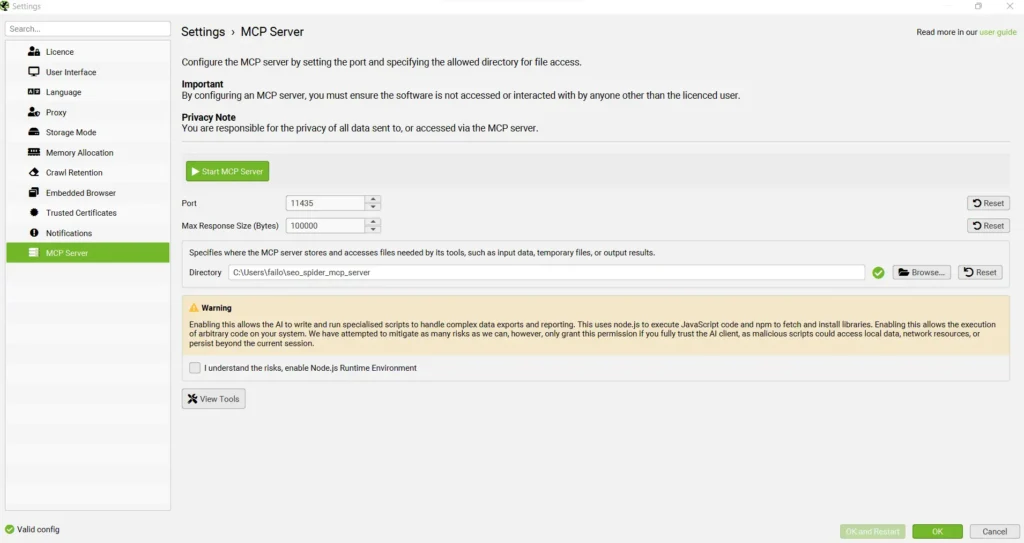
Think of MCP as a universal USB-C port for artificial intelligence. Before version 24.0, analyzing a 10,000-page crawl meant exporting giant CSV files, clogging up your AI’s context window, and waiting for the system to time out. With the open-standard MCP server developed by Anthropic, Claude can now run local command-line instructions, query your database, and summarize the results directly.
Here is something I saw first-hand last week. I was auditing a staging site for an e-commerce client that had over 8,000 product pages, but their custom JavaScript was rendering links in a weird format. Instead of manually sorting through a giant spreadsheet, I shut down the Screaming Frog GUI which locks the database, ran the local Python-based MCP server, and asked Claude: “Find every page where the main navigation links are uncrawlable and map out the patterns”.
Within 30 seconds, Claude queried the local database, pinpointed the exact Javascript errors, and mapped out a developer-ready fix. That is the power of AI-driven technical SEO.
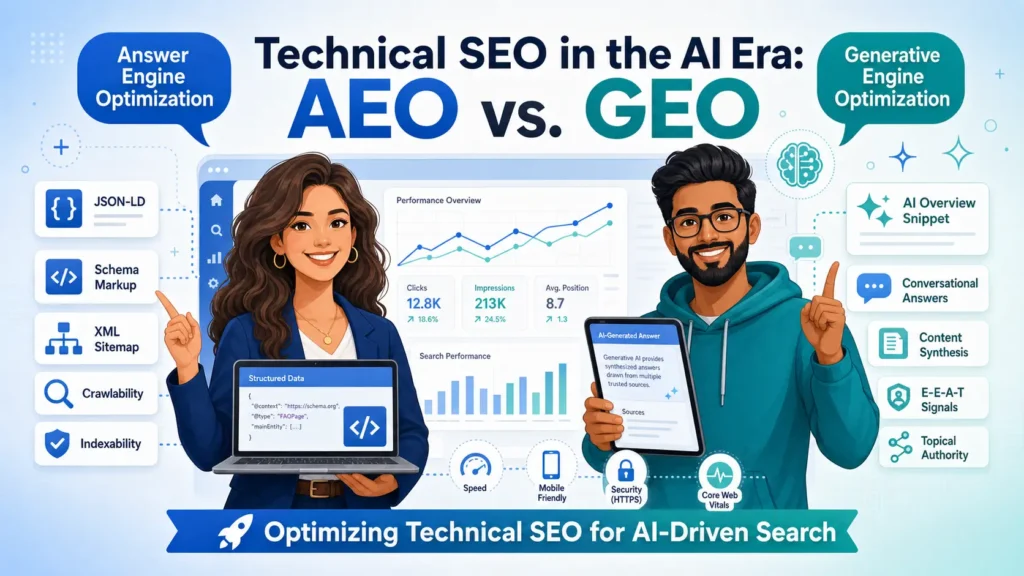
Is traditional SEO dead or do AEO and GEO require the same plumbing?
Traditional SEO is not dead, because AI search engines and answer bots still rely on standard website crawlability to find and cite your content.
Do not believe the doomsday bloggers. Gartner predicts a 25% drop in traditional search engine volume by 2026 as users shift to AI answers. But those AI summaries (like Google AI Overviews or Perplexity) don’t pull facts out of thin air. In fact, BrightEdge reports that 54.5% of AI Overview citations come from pages that rank in the top organic results. To show up in AI search, your technical plumbing has to be pristine.
Here is how these search strategies stack up side-by-side:
| Strategy | Targets | How Content is Structured | Primary Benefit | Best For |
| Traditional SEO | Traditional search bots (Googlebot, Bingbot) | Keyword-optimized HTML, standard internal links, clean XML sitemaps | High organic rankings and direct website referral traffic | Long-term organic traffic and high-volume keywords |
| AEO (Answer Engine Optimization) | AI chatbots and voice assistants (Claude, ChatGPT, Alexa) | Structured Q&A formats, direct schema markup, machine-readable text | Direct citations in AI-generated answers and voice search | Informational queries, comparisons, and direct voice answers |
| GEO (Generative Engine Optimization) | Generative search results (Google AI Overviews) | Authoritative, entity-rich content with structured validation | High-visibility placement in hybrid search summary blocks | Retaining traffic on highly commercial search queries |
What I do differently now is prioritize “Link Crawlability” immediately. In my audits, I use Screaming Frog’s new Link Crawlability column to make sure our high-value pages aren’t buried behind complex Javascript elements that search bots and AI scrapers struggle to parse. If a bot cannot crawl your link, your content will never make it into an AI’s training data or live search index.
How much does Screaming Frog cost, and is the paid license worth it?
Screaming Frog costs $279 per year for a single license, and the paid plan is mandatory to crawl over 500 URLs or use AI features.
If you are auditing a small, 50-page brochure site, the free version is perfectly fine. But using the free version of Screaming Frog for a massive e-commerce site is like trying to vacuum a football stadium with a hand-held Dustbuster. The moment you need to audit staging servers, render heavy JavaScript, or connect your database to Claude, the free version locks you out.
Here is how the free and paid plans compare:
| Version | Annual Cost | URL Crawl Limit | Key Features | Best For |
| Free Version | $0 | 500 URLs | Find broken links, generate XML sitemaps, audit page titles | Small websites, quick one-off testing, and beginners |
| Paid License | $279 per license | Unlimited crawling | JS rendering, Google integrations, MCP AI tools, forms-based auth, tech support | Growing businesses, agencies, and professional SEOs |
If you purchase in bulk, the pricing drops slightly. For example, buying 5 to 9 licenses brings the cost down to $265 per license per year, which is highly competitive compared to cloud-based tools that charge hundreds of dollars per month.
How do I install and configure the Screaming Frog v24.0 update?
You can install the version 24.0 update by running the latest installer executable directly over your current installation directory.
Updating to the latest “bolus” version is straightforward, but setting up the advanced database and AI integrations requires a bit of preparation.
What you’ll need:
- An active, paid Screaming Frog license.
- Python 3.10 or later installed on your machine.
- Claude Desktop or another MCP-compatible AI client.
- About 15 minutes of uninterrupted setup time.
Step 1: How do I download the latest release for my operating system?
Go to the official Screaming Frog SEO Spider page and download the installer. Run the .exe file on Windows, mount the .dmg on macOS, or download the .deb package if you are using Ubuntu. If you are on Linux, you can run a silent command-line installation by entering sudo apt-get install ~/Downloads/screamingfrogseospider_24.0_all.deb in your terminal.
Step 2: How do I configure database storage for large crawls?
Open the application, navigate to File > Settings > Storage Mode, and select Database Storage. If you are using an SSD, this setting is critical because it automatically commits crawl data directly to your drive, allowing you to crawl millions of URLs without running out of memory.
Quick Win: Go to your spider configuration settings and check the “pause on high memory usage” option under Advanced. This prevents the app from freezing your entire machine if your crawl hits a massive technical bottleneck.
Step 3: How do I run a headless crawl via the Command Line?
Open your terminal, navigate to your installation directory, and enter ScreamingFrogSEOSpiderCli.exe –crawl https://yourwebsite.com –headless –save-crawl. Running in headless mode bypasses the heavy graphical interface, saving up to 40% of your computer’s CPU and RAM.
Step 4: How do I connect the database to Claude Desktop?
Clone the open-source screaming-frog-mcp repository from GitHub and install the requirements via pip. Close the Screaming Frog GUI to release the database lock, point your Claude Desktop configuration file to the MCP server directory, and launch Claude.
Quick Win: Run ScreamingFrogSEOSpiderCli.exe –help export-tabs to print out every valid export tab name for your current version, preventing configuration errors when writing automated export scripts.
What do most technical SEOs get wrong when crawling large websites?
Most technical SEOs fail by crashing their machines during large crawls due to poor memory allocation and aggressive crawl speeds.
Does Google penalize sites with duplicate content?
Many content marketers still believe Google actively hands out negative ranking penalties for duplicate content. This is a myth. Google Search Strategist Andrey Lipattsev confirmed there is no such thing as a duplicate content penalty. In reality, duplicate content simply dilutes your backlink equity and wastes your crawl budget, meaning search engines might ignore your high-value pages entirely.
Can Googlebot easily crawl modern JavaScript links?
Developers often assume that modern, highly interactive JavaScript click events are perfectly fine for SEO. They are wrong. Screaming Frog’s research indicates that while Googlebot tries to parse anything that looks like a URL in the HTML, non-standard hyperlinks like <span href=”…” or custom <onclick=”goto(‘…’)” directives are highly unreliable for passing core link signals. You must stick to clean, standard <a href> hyperlinks.
The honest truth is that search engine optimization is moving faster than our documentation. Even seasoned experts still argue about how Googlebot treats synthetic links versus traditional hyperlinks. But if you want to future-proof your site for both search engines and generative answer engines, clean code is the only currency that consistently pays off.
Frequently Asked Questions
Q: Is Screaming Frog a cloud-based tool or a desktop application?
A: Screaming Frog is a local desktop application that you install on your computer, meaning crawl speeds are limited by your local machine’s processing power and memory allocation.
Q: Does technical SEO still work in 2026?
A: Yes, technical SEO is more critical in 2026 because AI engines and answer engines rely entirely on clean, accessible website architecture and structured data to find their answers.
Q: Should I use Screaming Frog or Ahrefs Site Audit?
A: Use Screaming Frog for deep, real-time developer-level technical audits and custom data extraction, and use Ahrefs Site Audit for continuous, automated cloud-based monitoring.
Q: How do I start crawling my site?
A: To start a crawl, set the mode to ‘Spider,’ type your homepage URL into the search bar at the top, and click ‘Start’.
Q: What happens if I ignore technical SEO issues?
A: If you ignore technical issues, your site will waste its crawl budget on error pages, suffer from diluted backlink equity, and witness a steady decline in rankings.
Q: Do I need to redo all my existing content for AEO?
A: No, you do not need to rewrite your entire website; instead, prioritize your top-performing, high-traffic informational pages first and restructure them with direct Q&A formats and schema markup.
If you want to make sure your site is fully ready for both traditional search bots and generative AI answer engines, let’s chat. Connect with me on LinkedIn to get real-time technical SEO breakdowns, or reach out to get a custom, developer-ready audit that cleans up your site’s architecture.
Written by Failon OB: SEO Specialist with more than a decade of experience in SEO. I help brands get found by humans and by the AI systems that answer on their behalf. Working with clients in e-commerce, real estate, and commercial services from Toronto, ON. failonoben.com | Connect on LinkedIn